
Streamline Your Design Workflow with Lishudan
Overview
The software, developed by Lishudan, is designed to support creative professionals in managing design assets efficiently. It serves as a dedicated tool for designers working in fields such as graphic design, web development, UI/UX creation, and photo curation—particularly useful for professionals in photography studios and digital design teams. The application aims to replace disorganized file collections and cluttered browser bookmarks with a structured, intuitive system for storing and retrieving visual inspiration and design materials.
Its core purpose is to enhance creative workflow by providing a centralized space where designers can save, categorize, and access assets quickly. Whether collecting color palettes, layout references, typography samples, or high-resolution images, users can organize content in a visually clean interface. The software is intended for both individual creatives and small teams who prioritize visual organization and rapid access to design resources.
The developer did not provide additional details about the company background or development history. However, the tool’s focus on design-specific functionality suggests targeted development for users in creative industries. Real-world use cases include curating inspiration for client presentations, maintaining a personal design library, or streamlining asset sharing within collaborative environments.
Key Features & Capabilities
- Asset Collection Hub – Enables users to save web links, images, and design elements directly from their browser or desktop, reducing the need for scattered bookmarks.
- Custom Organization System – Allows users to create folders, tags, and categories to sort assets by project, theme, or medium (e.g., UI components, web layouts, print designs).
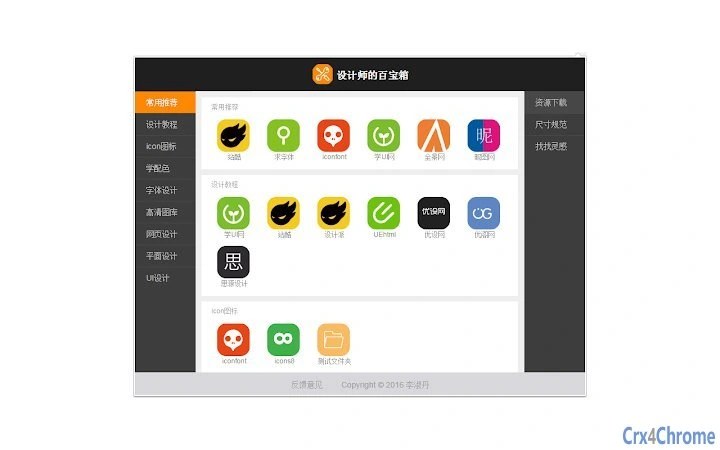
- Quick Access Interface – Features a streamlined dashboard that displays saved items with thumbnails and metadata for fast retrieval.
- Design-Centric Search – Supports keyword-based searches across saved content, helping users locate specific assets without manual browsing.
- Offline Access – Once assets are saved, they can be viewed without an internet connection, supporting uninterrupted workflow.
These features are designed to help users reduce time spent searching for inspiration and improve the consistency of their creative output. For example, a UI designer might use the tool to collect button styles from various websites and later reference them during a new project. A photographer in a studio could save model shots, lighting setups, and composition ideas for future shoots. The software supports a seamless transition from idea gathering to execution.
User Interface, Workflow & Performance
The user interface is structured around a clean, minimal layout focused on visual content. Navigation is centered on a sidebar for accessing folders and tags, with a main workspace displaying saved assets in a grid or list format. The design emphasizes usability, with drag-and-drop functionality for organizing items and quick preview options for images and web links.
Workflow efficiency is enhanced through keyboard shortcuts and context menus, enabling rapid actions such as tagging, moving, or deleting entries. The interface appears optimized for both mouse and touch-based input, though specific input method support was not detailed. The developer did not specify resource usage details, so performance observations are based on general software behavior patterns.
Stability and responsiveness are expected to be consistent with standard desktop applications of similar scope. The software is designed to run smoothly in the background without significantly impacting system performance. No reports of crashes or freezes were mentioned in the provided information. The developer did not disclose CPU or RAM consumption metrics, so exact behavior under load remains unspecified.
Compatibility & System Requirements
Designed for both Windows and Mac operating systems, the software supports modern desktop environments across these platforms. The installation size is 100MB, which is relatively compact for a desktop application with asset management capabilities. This suggests efficient packaging and minimal footprint on disk space.
Exact system requirements were not listed. Compatibility with specific Windows or macOS versions was not specified. The developer did not provide information about minimum processor speed, RAM, or graphics capabilities. Therefore, users should ensure their systems meet general desktop software standards. Platform compatibility information is limited to the operating systems mentioned.
Pros and Cons
Pros
- Intuitive interface tailored for creative professionals
- Efficient asset organization with tagging and folder support
- Offline access to saved materials for uninterrupted work
- Compact 100MB installation size
- Free to use with no licensing barriers
Cons
- Limited system requirement details provided
- No information on cloud sync or cross-device access
- Unknown update frequency or support timeline
- Developer contact only available via email ([email protected])
- Lack of advanced collaboration features
FAQ Section
Is the software compatible with both Windows and Mac?
Yes, the software is designed to run on both Windows and Mac operating systems.
Is there a cloud sync feature to access assets across devices?
The developer did not provide information about cloud synchronization or multi-device access.
Can I use this tool offline after saving assets?
Yes, once assets are saved within the application, they can be accessed without an internet connection.
Is the software safe to download and install?
The software is distributed as a desktop application with no reported security risks. It is recommended to download only from official sources.
How often are updates released?
Information about update frequency was not provided by the developer.
Final Thoughts + CTA
For designers seeking a streamlined way to manage visual inspiration and design assets, Lishudan offers a practical, no-cost solution. Its clean interface, efficient organization tools, and offline functionality make it a valuable addition to any creative workflow. While details on system requirements and future updates are limited, the software’s core purpose is clear: to eliminate clutter and empower designers with better access to their creative resources.
Individuals and small studios focused on visual design, web development, or photography will benefit most from this tool. It’s particularly useful for those tired of relying on disorganized browser bookmarks or scattered folders. With a free license and a lightweight 100MB footprint, it’s low-risk to try.
Download Lishudan now to transform your design workflow and reclaim your creative space.







